
What’s New
Curious about what we’ve been up to? Check out the latest features and updates our team has rolled out to make your work faster, smarter, and way more enjoyable. Dive in and see what’s new—you might just find your next favourite tool!

16 July 2027

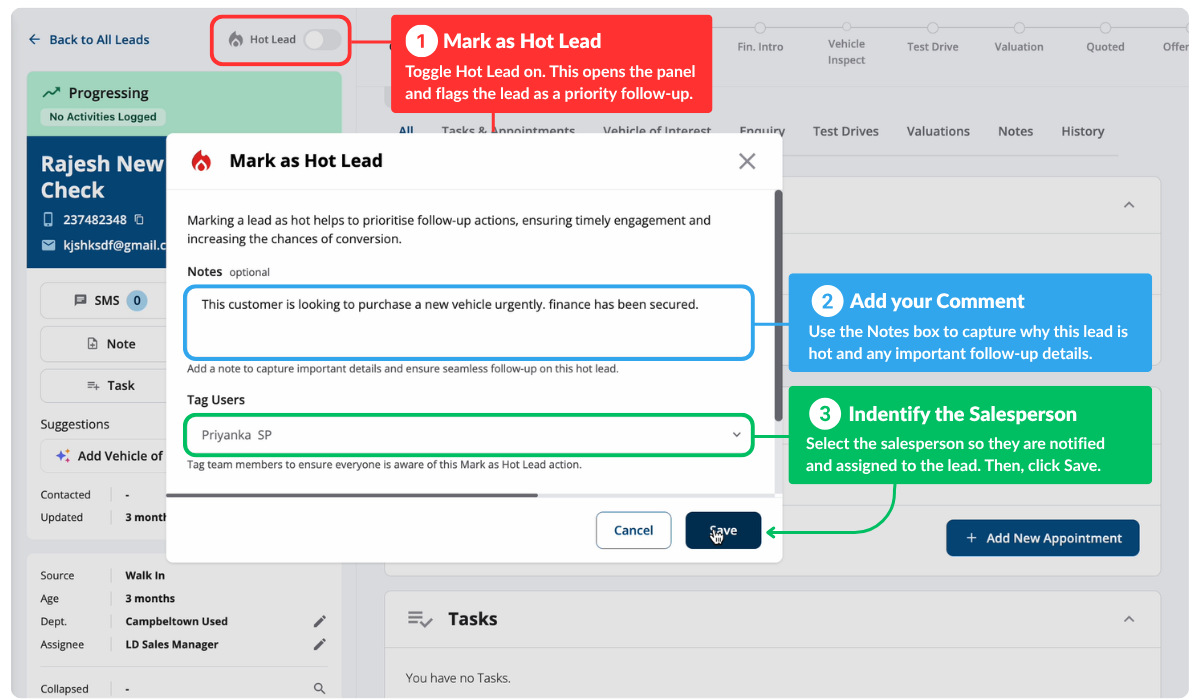
Hot Leads
With Hot Leads, you can now flag your best opportunities with one click, allowing sales teams to see the leads with a higher chance of converting to a sale at a glance. It’s simple: when you spot a high-intent lead, mark it hot. Your whole team knows exactly who to focus on first.
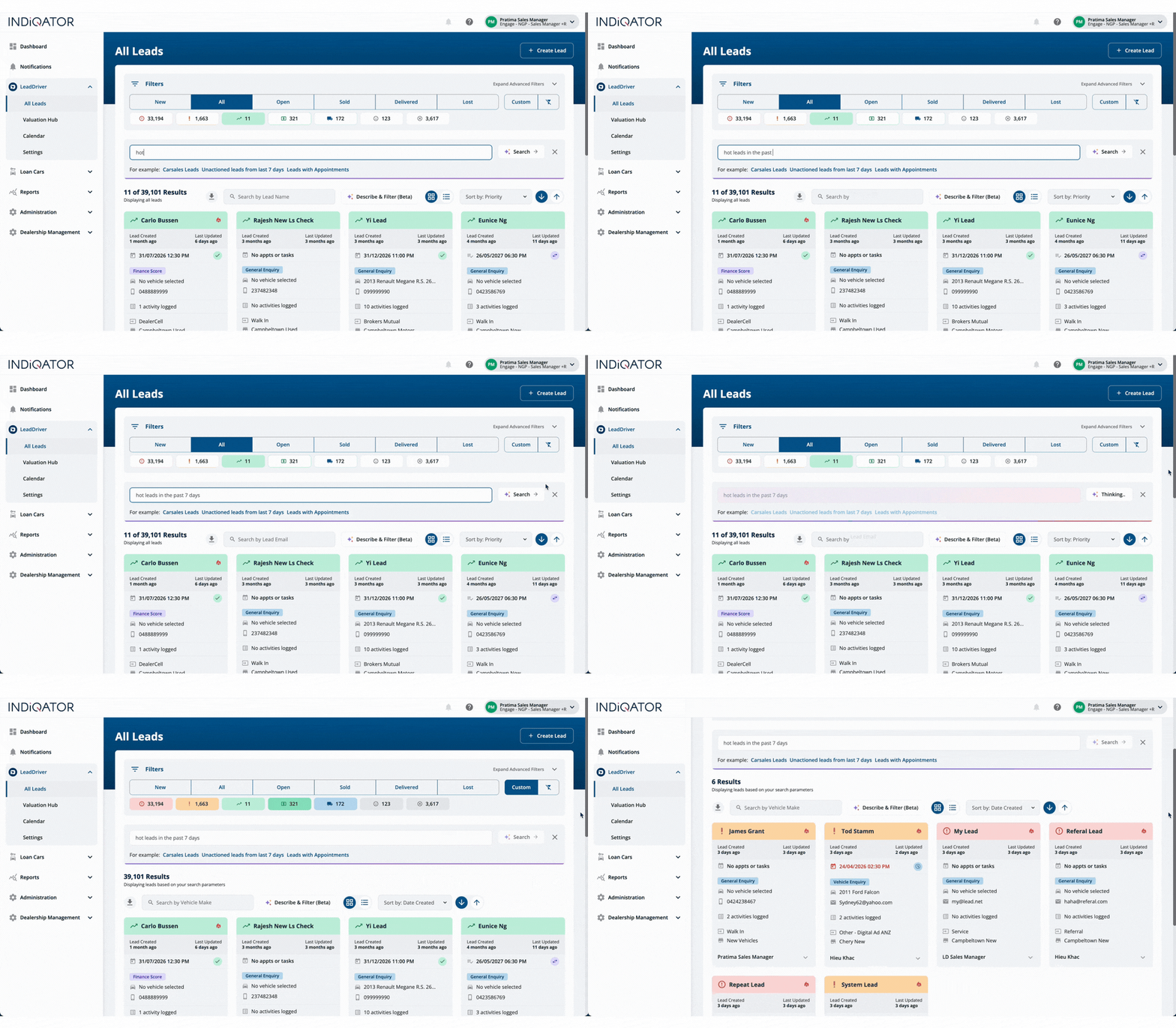
Natural Language Search
Search as you think. Describe the leads you want in plain English.
Example: “Hot leads from the past 7 days”
Instead of navigating through filters, just type what you’re looking for. Instant results. Perfect for the everyday searches your team does dozens of times a day.

15 June 2026
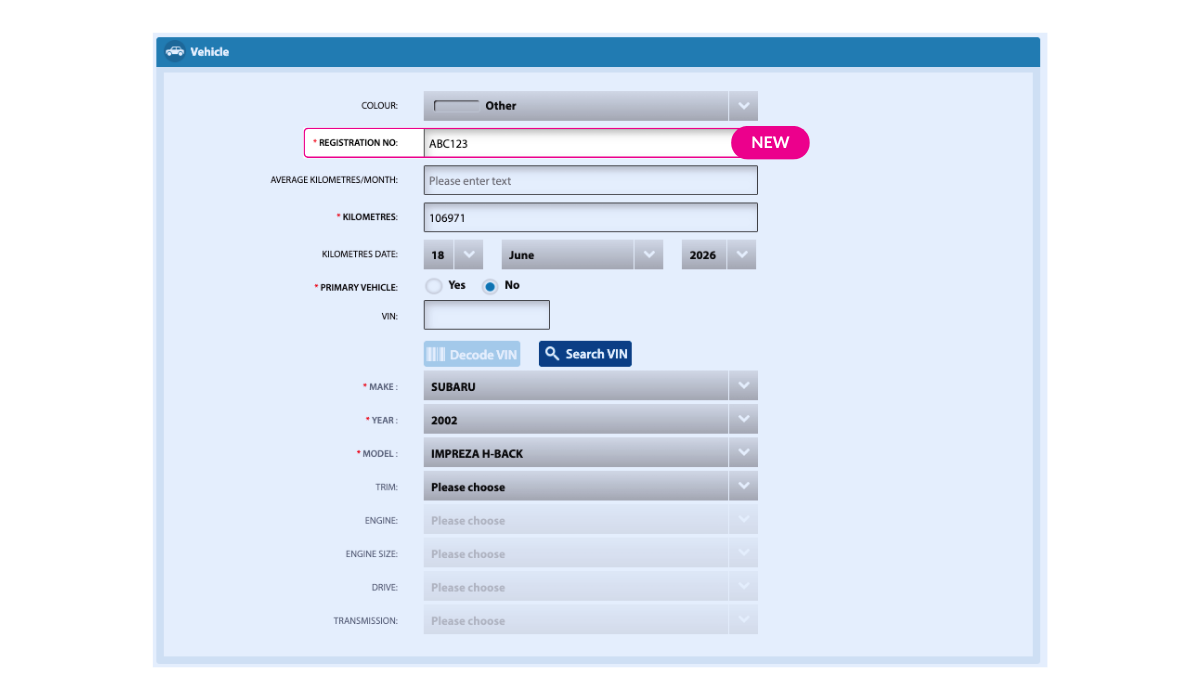
Vehicle Lookup by Registration Plate
Service advisors can now look up customer vehicles using the registration plate directly in Scheduler — no VIN needed. When the vehicle make is supported at your dealership, the system automatically resolves the full vehicle details and pre-populates the appointment form. Manual entry remains available as a fallback for any vehicle.
Appointment Status Visibility
Customers using the Consumer Portal will now see a “Tentatively scheduled for service” indicator for lead appointments, giving them clearer visibility into their service pipeline.
Appointment Cancellation API
A new cancellation endpoint is now available for partner systems and AI booking flows. It supports two cancellation paths: fast cancellation using a confirmation key, or lookup-based cancellation using vehicle or customer data. Built-in safeguards prevent double-cancellation or cancellation of in-progress appointments.
Richer Lead Data to LeadDriver
Home Check-In now sends complete context to LeadDriver, our AI lead management system, including vehicle details and appointment information, along with customer data. Sales teams can now follow up with full visibility of the check-in details.
View how Home Check-In works →
Structured Cancellation Reasons
The appointment cancellation dialog now uses predefined cancellation reasons instead of free-text entry. This enables consistent reporting and better insights into why appointments are cancelled. An optional “Other” field captures additional detail when needed.
1 June 2026

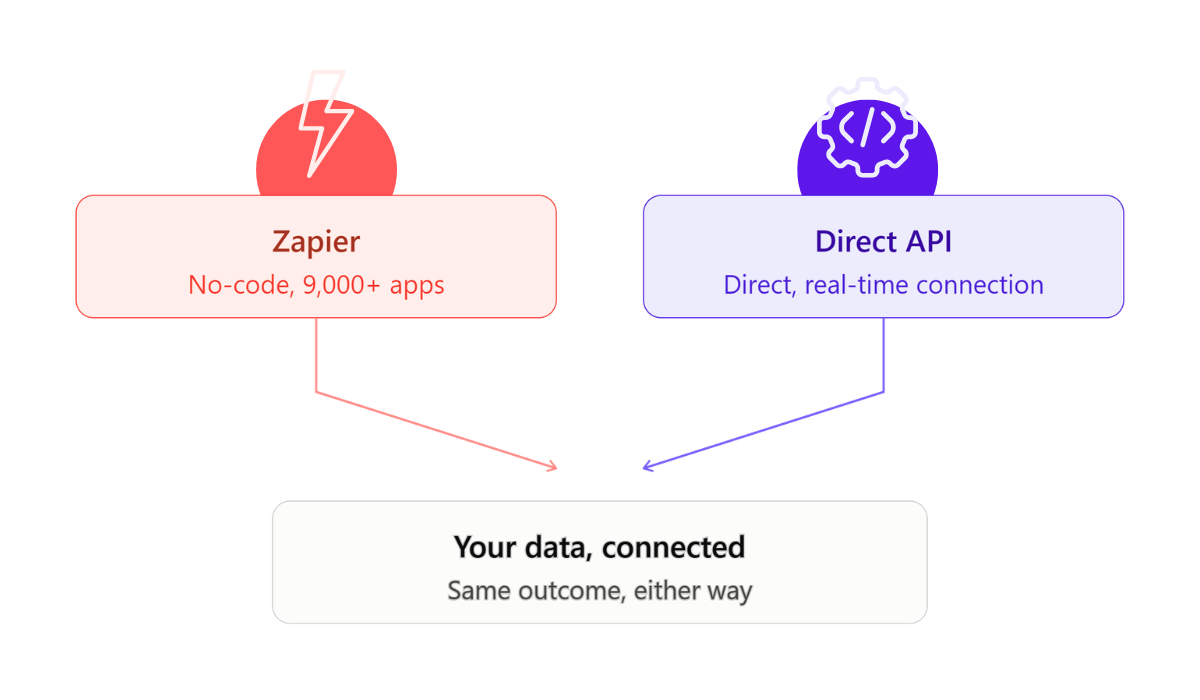
More ways to connect your data: Introducing LeadDriver Leads API
You may already know LeadDriver connects to 9,000+ apps via Zapier, no code required. Now there’s a second option: a direct, real-time API for teams who want a closer, more customised connection. Same outcome — your data flowing automatically between LeadDriver and the tools you rely on — just two ways to get there, depending on what suits your setup.
If you work with a partner or provider who wants to explore the API route, use this link or let us know here, and we can show you what’s next.
You can now sign into LeadDriver using your fingerprint, face, or device PIN — no password, no separate code. It takes a few seconds, and you can set it up next time you log in.
Lost your phone or switched devices? You can now reset your login security in a couple of clicks from your My Account page, without waiting on a support call.
8 JUNE 2026
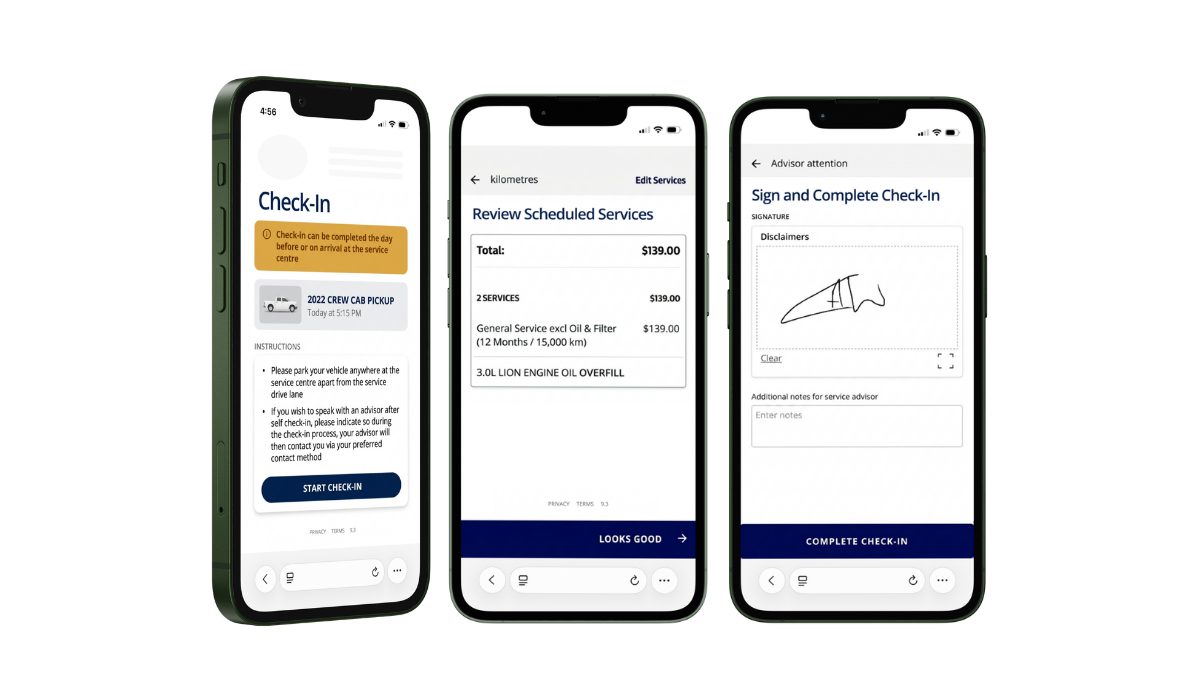
New Feature — Xtime Home Check-In
Service Platform · Paid Add-On · Available Now
Service customers can now complete their check-in before they arrive at the dealership — from their phone, at a time that suits them. Think airline pre-check-in: the key steps are done ahead of time, so customers can park, drop their keys, and leave immediately. No queue, no waiting at the desk, and no extra workload for your service team.

20 MAY 2026

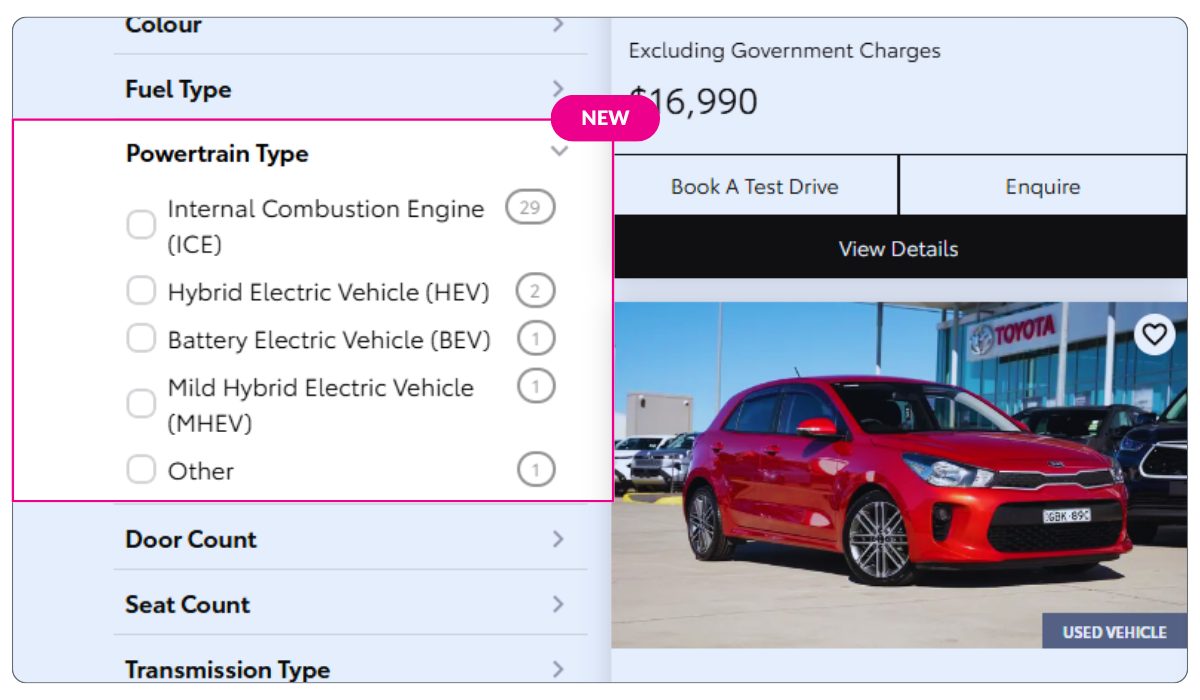
New in Websites: Powertrain Filtering.
We’ve introduced a new filter in Radius websites to help car buyers find the right vehicle faster with Powertrain filtering.
Whether your customers are searching for petrol, diesel, hybrid, or electric vehicles, you can ensure every lead is qualified and relevant from the start.
This added layer of filtering improves search accuracy, enhances the customer experience, and helps your team focus on high-intent enquiries.
By connecting buyers with the right vehicles sooner, you’ll drive better conversations, stronger engagement, and more conversions.
If you’re using Radius, you can enable this new feature in the Radius CMS so your customers can filter vehicles by powertrain, making it easier to find the right match!
14 MAY 2026
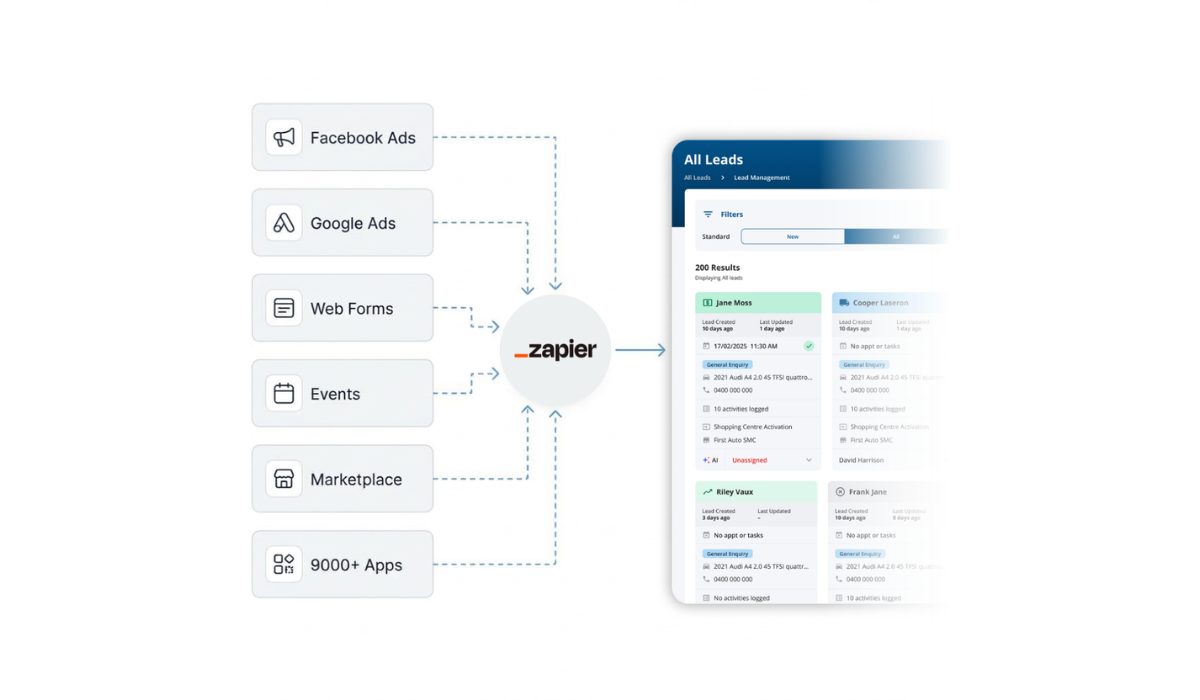
New Integration: Connect Your Lead Sources with Zapier
Bring every lead into one system — automatically.
You can now connect LeadDriver to thousands of lead sources, including Meta Lead Ads, event platforms, and CRM tools, using Zapier. No developers needed and no more manual imports. Leads flow into LeadDriver instantly, are correctly assigned, and are ready for your team to act on straight away.
With access to over 9,000 supported apps, you can consolidate your entire lead ecosystem into a single, reliable platform — giving you a complete and accurate view of every opportunity from day one.
When a lead is marked as Sold or Delivered, you can now select the exact vehicle from a dropdown list of all Vehicles of Interest — including vehicles from merged leads.
The chosen vehicle is clearly labelled, and the full vehicle description is now captured in history and reporting.
Why this matters: It ensures the right vehicle flows through to reports, partner updates, and DMS — no more guesswork about which vehicle was actually sold.
The Enquiry tab has been redesigned to make information easier to scan and act on.
Everything you need, exactly where you expect it.
Tasks and Appointments now support direct keyboard date entry.
Type the date. Save. Done.
A small improvement — but a real time‑saver for long‑term follow‑ups scheduled months (or years) ahead.
This gives you clearer insight into where leads are coming from and how they’re performing.
27 MARCH 2026
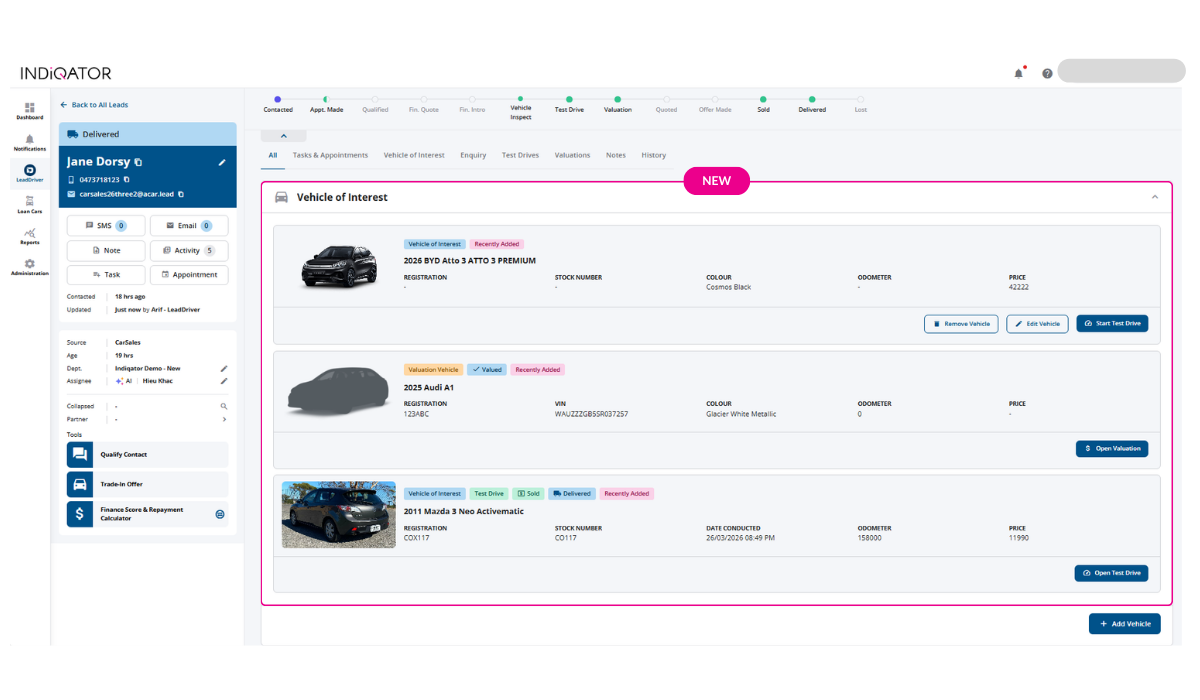
New Vehicle of Interest Hub
When a lead is marked as Sold or Delivered, you can now select the exact vehicle from a dropdown list of all Vehicles of Interest — including vehicles from merged leads.
The chosen vehicle is clearly labelled, and the full vehicle description is now captured in history and reporting.
Why this matters: It ensures the right vehicle flows through to reports, partner updates, and DMS — no more guesswork about which vehicle was actually sold.
The Enquiry tab has been redesigned to make information easier to scan and act on.
Everything you need, exactly where you expect it.
Tasks and Appointments now support direct keyboard date entry.
Type the date. Save. Done.
A small improvement — but a real time‑saver for long‑term follow‑ups scheduled months (or years) ahead.
This gives you clearer insight into where leads are coming from and how they’re performing.
13 MARCH 2026
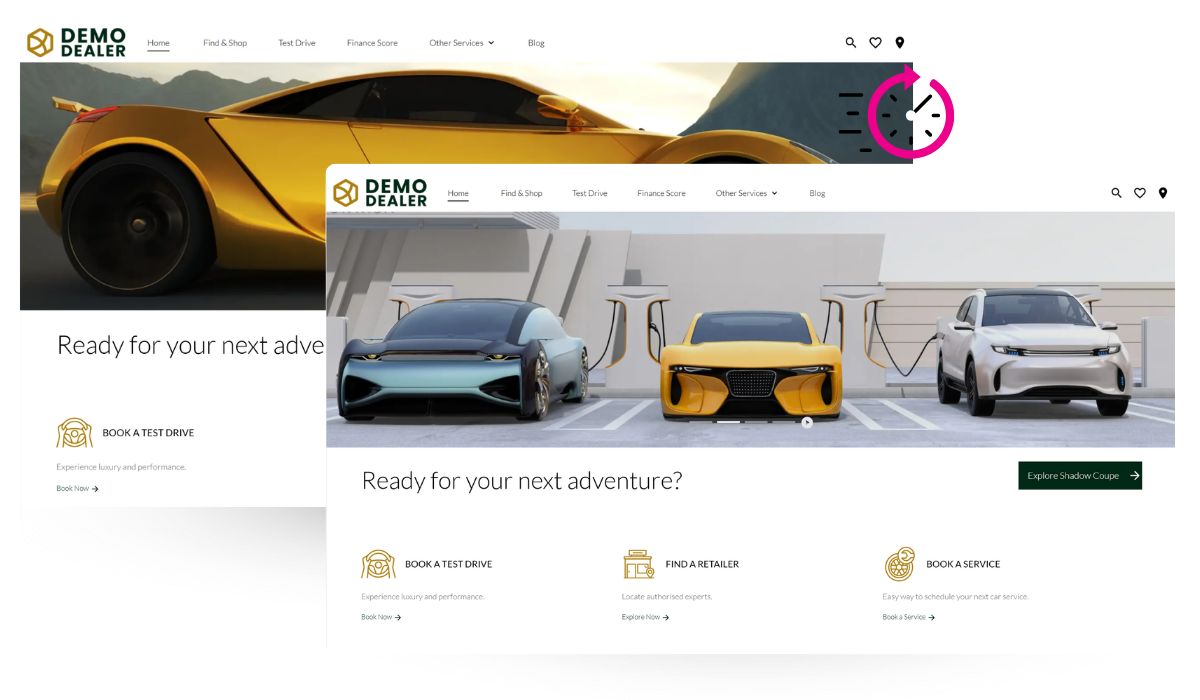
Radius websites now automatically refresh the moment you publish changes, so what you see in the CMS is what your customers see — immediately.
Previously, Radius operated a high-performance caching layer designed for the reliability and scale demands of enterprise automotive retail. This infrastructure ensures your dealership website handles traffic spikes, delivers fast load times, and maintains uptime across high-demand periods. We’ve now extended this system to automatically trigger a cache refresh on publish, so you get the best of both worlds: enterprise-grade performance with the immediacy you expect.
What’s covered:
12 MARCH 2026
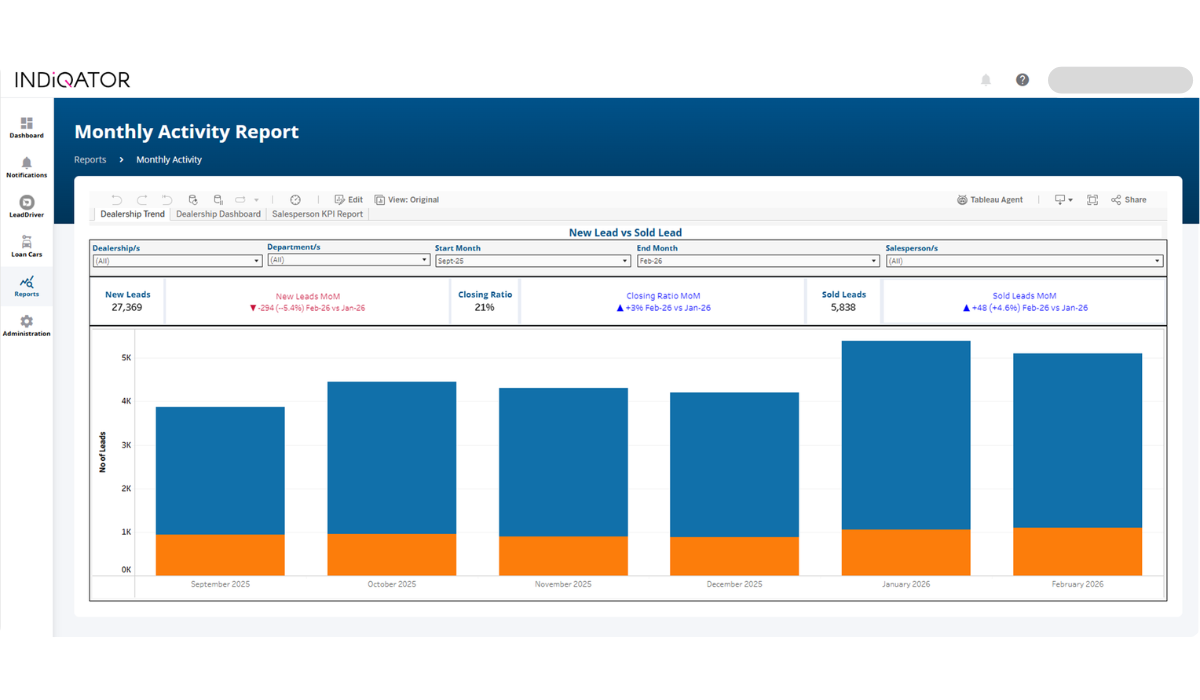
New Dealership Trend Dashboard
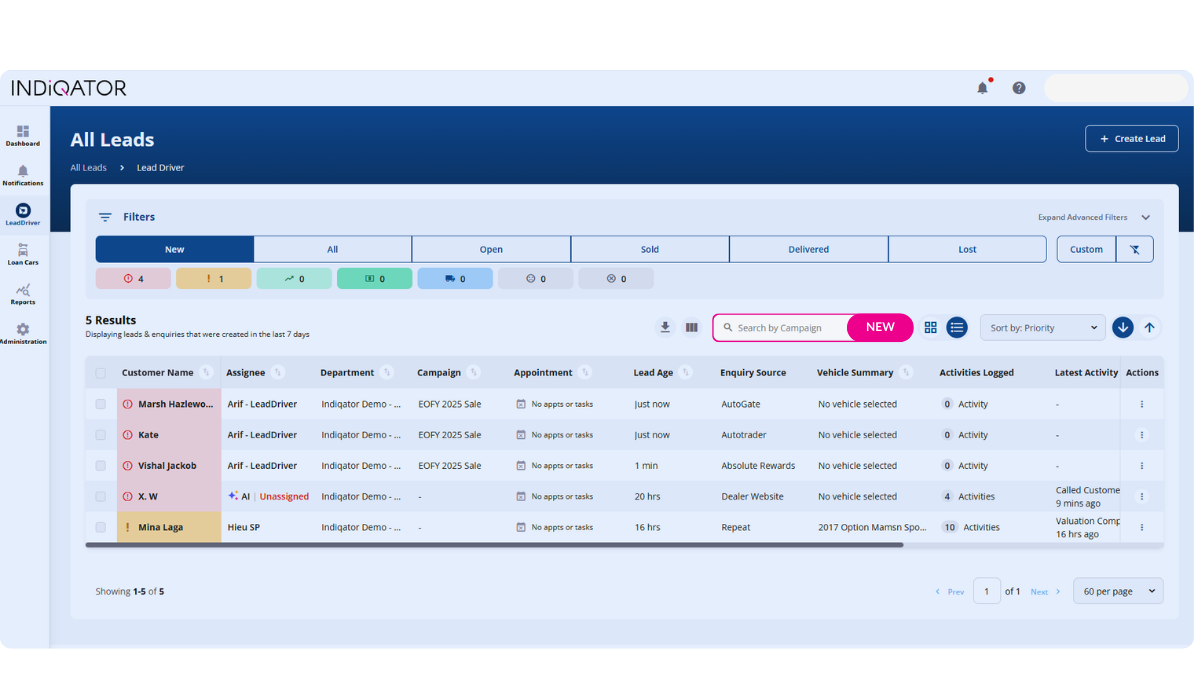
Dealerships often run multiple campaigns simultaneously and need visibility into which ones are generating traction. You can now search leads by Campaign Name, making it easier to attribute performance back to your marketing efforts.
You can also add Campaign as a column in your lead list view, helping sales managers quickly assess lead quality and conversion trends for specific campaigns — and ultimately understand which initiatives deliver the strongest return.
Two of our most‑used reports have been refreshed to make them easier to read, faster to navigate, and more intuitive for users analysing large volumes of data.
What’s improved:
These additional KPIs provide earlier insight into engagement quality and time allocation, helping leaders better understand pipeline activity and sales discipline. The updated report manual now includes full explanations of these changes.
26 FEBRUARY 2026
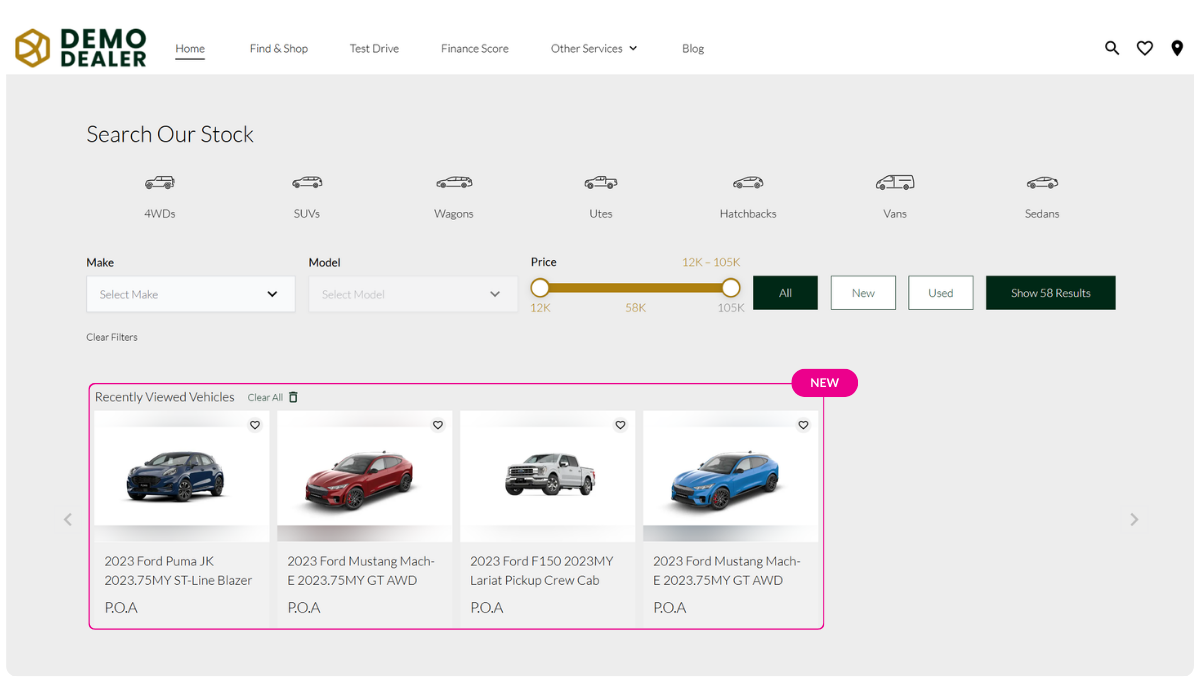
We’ve introduced a new Recently Viewed Vehicles blade across all dealership websites, making it easier for returning shoppers to pick up where they left off. The carousel highlights vehicles a visitor previously browsed, ordered by relevance—most viewed first, then most recently viewed. Each card links directly to the Vehicle Detail Page, with clearly marked Sold statuses where applicable. This feature reduces friction for high‑intent buyers and helps reconnect them with inventory they’ve already shown interest in.
A new advanced editor option is now available for title fields across Heading, Banner, and Hero Banner blades. Instead of managing separate size, weight, and alignment fields, users can switch to the advanced editor for a single, unified content editing experience. The default single-input behaviour remains unchanged.
On mobile devices, the Search Results Page filter panel now opens with all filter categories collapsed by default. This reduces visual clutter on smaller screens, makes the interface easier to scan, and ensures the Apply Filters action is clearly accessible without excessive scrolling.
18 FEBRUARY 2026
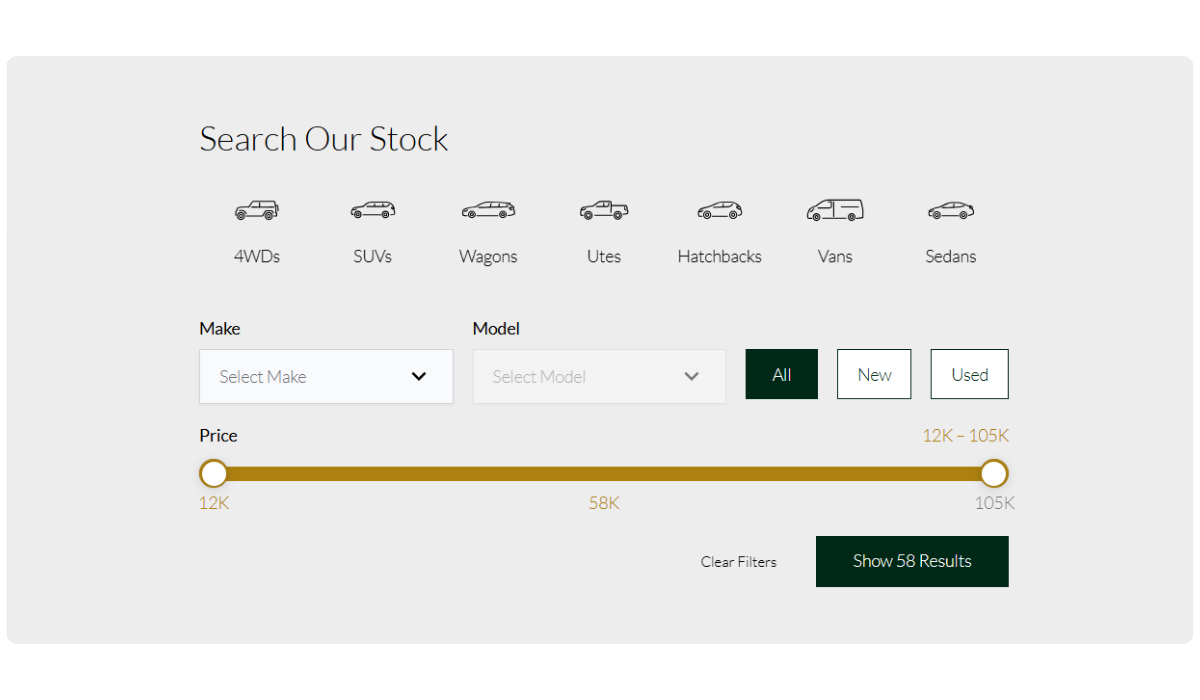
Search blades across all Radius websites are now simplified to just showing Make, Model, and Price by default.
Our analytics demonstrate that 61% of customers conduct searches using Make, Model, and Price filters, with only 39% utilising the remaining search fields. To streamline the website experience and increase vehicle listing views, we’re simplifying the search interface to focus on these primary interactions, making it quicker and easier for customers to find their vehicles. Mobile devices benefit from this change greatly, with less fields resulting in an easier to navigate search interface.
Year, Keyword, and Location are configurable items allowing dealership websites to toggle these filter items back on if they desire.
13 FEBRUARY 2026
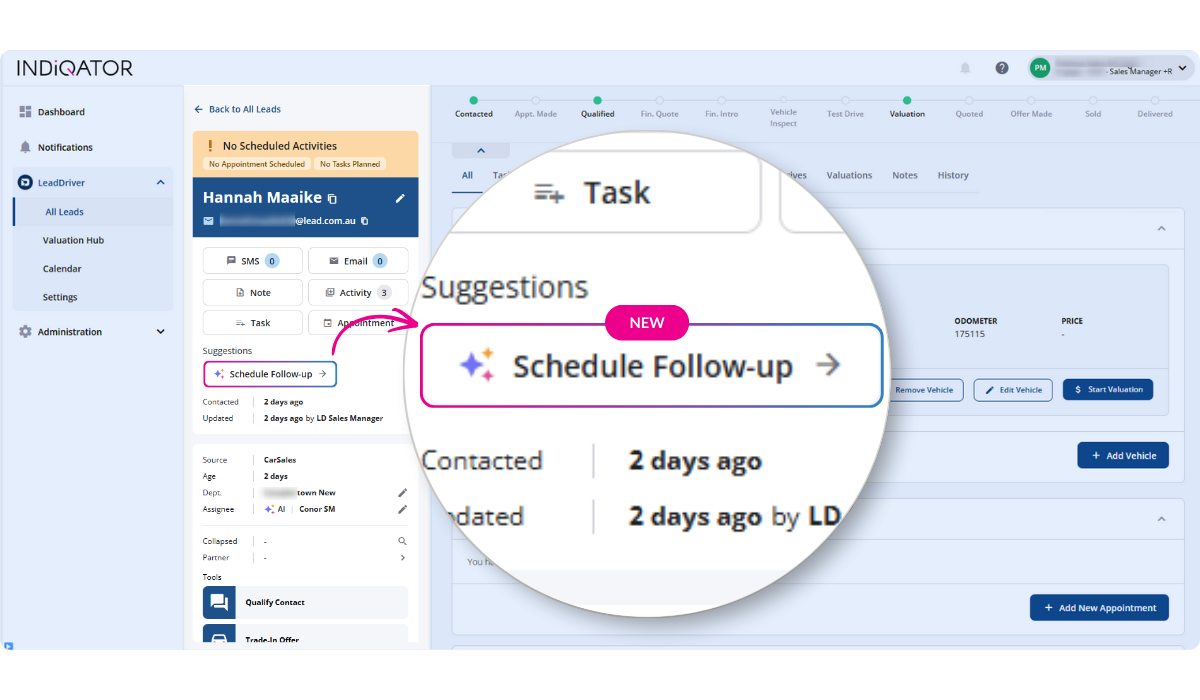
Suggested Actions, LeadDriver’s new feature saves reps time and gives managers reporting that reflects what’s really happening. It uses live lead data to deliver one‑click guidance—less admin, more selling, and stronger conversions.
It runs quietly in the background, surfacing the most relevant next step and reinforcing consistent, high‑performing sales behaviours. As a result, Suggested Actions will get smarter over time, always offering a one-click next-best-action.
This release includes 30+ Suggested Actions, and with insights from millions of leads, we’ll continue to expand and refine them to support more stages of your sales process.
Qualify Customer
Surfaces when contact has been made with the customer. This helps the team gather essential information early and progress the lead through the sales process.
Schedule Follow‑Up
Helps ensure no lead is left behind. This action appears when a follow‑up has not yet been booked, encouraging consistent lead nurturing.
Add Vehicle of Interest
Appears when a lead does not yet have a Vehicle of Interest attached. Capturing this detail early improves data quality and strengthens future reporting.
Start a Test Drive
Appears when the lead moves into the active engagement stage. This supports seamless progression into a key conversion step in the sales journey.
Book Vehicle Delivery
Triggered when a lead is marked as sold. This helps close the loop and ensures delivery details are captured promptly.
14 JANUARY 2026
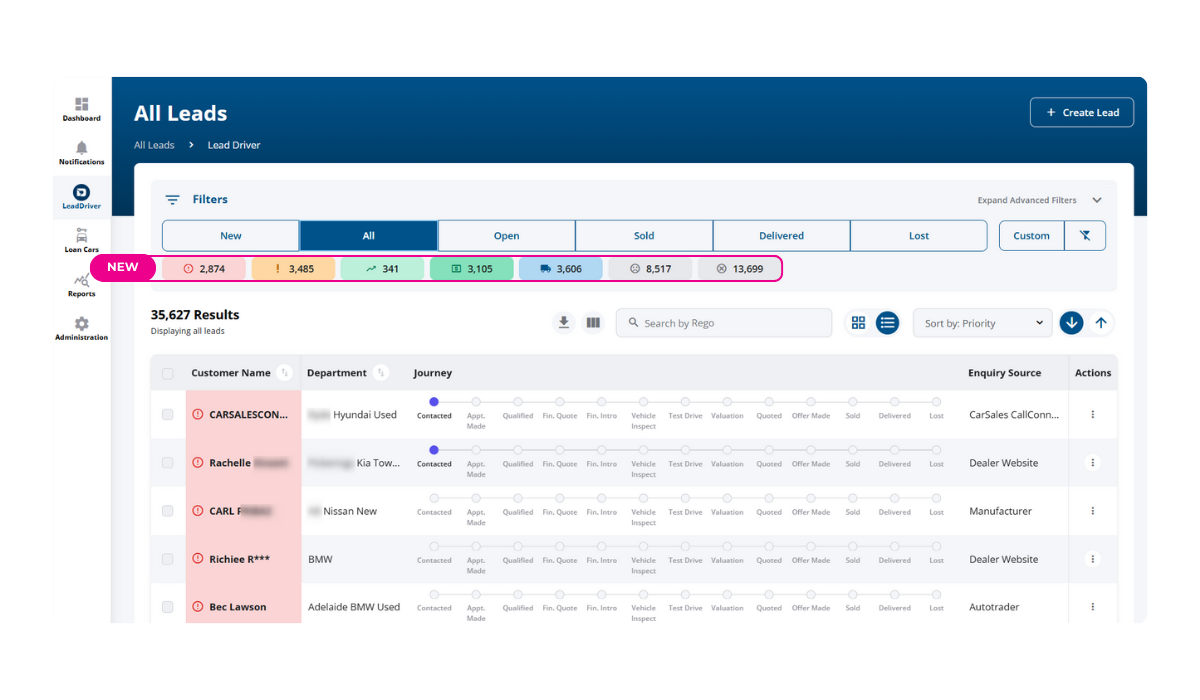
Behold the traffic light filters! We’ve added another layer of filtering in LeadDriver All Leads view. Users can now filter leads by traffic‑priority colour (e.g., Red for urgent, Amber for pending, Green for progressing) for faster, more targeted lead management. Even better, the traffic light filters remember your last selection, making the experience faster and more intuitive each time you return. Traffic light filters are available to all LeadDriver users.
New Lead Source: Digital Ads
You asked, we delivered! A new lead source, Digital Ads, has been added. This addition helps capture leads from your digital campaigns more effectively.
19 DECEMBER 2025
4 NOVEMBER 2025
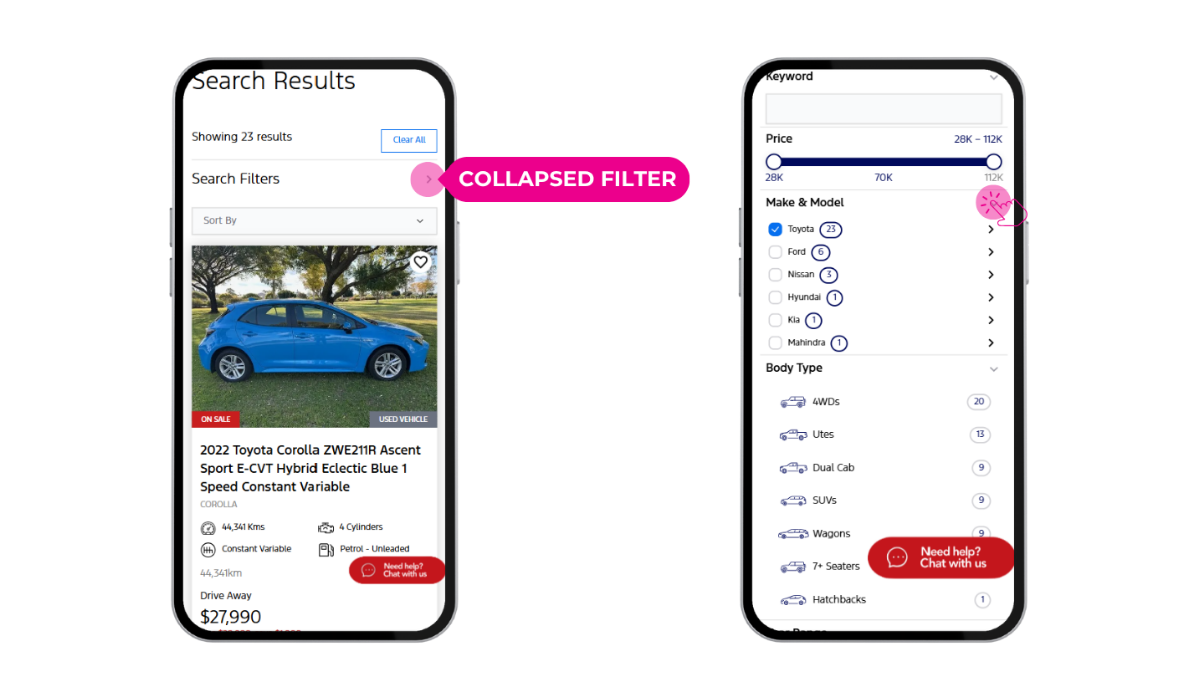
Search results pages on mobile now feature a collapsed filter view, making it easier for users to navigate listings. This update brings vehicle results across all dealership websites built on our Radius platform higher on the page, streamlining the browsing experience and helping customers find what they’re looking for faster.
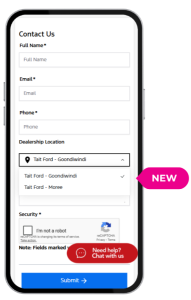
Location Control on Forms
You can now limit location options on your website forms. This added functionality allows for more tailored form configurations, ensuring customers are directed to the most relevant dealership locations.
Continuous Platform Improvements
We’re always working behind the scenes to keep our Radius website platform running smoothly and efficiently. Recent updates include refinements to visual styling, improved data integrations, and enhanced stability across key features. These ongoing improvements ensure your dealership website remains fast, reliable, and aligned with best-in-class digital standards
31 OCTOBER 2025

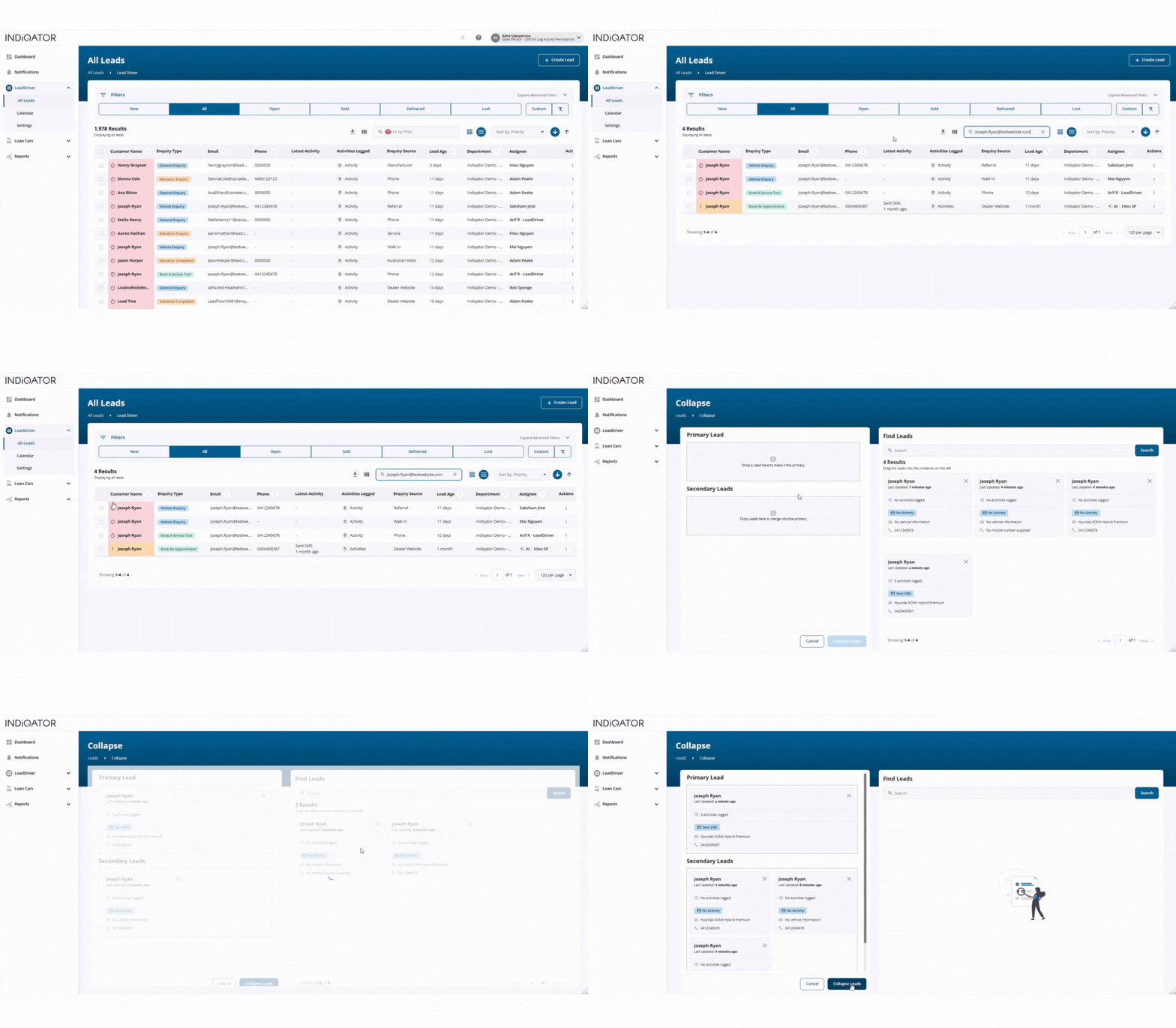
Bulk Collapse Now Pre-Selects Chosen Leads
When users initiate a bulk collapse from the lead list, the selected leads now appear pre-selected in the collapse view. This allows for immediate drag-and-drop assignment as primary or secondary leads—saving time and reducing friction in the lead consolidation process.
New “Start Valuation” Button for Buying Department Leads
For valuation-related enquiries and buying department leads, a new “Start Valuation” button replaces the previous Start Test Drive option. This feature enables sales teams to launch the valuation process directly from the Vehicle of Interest view, with registration and state details automatically populated, eliminating manual navigation and data entry. Take a look at the quick video below:
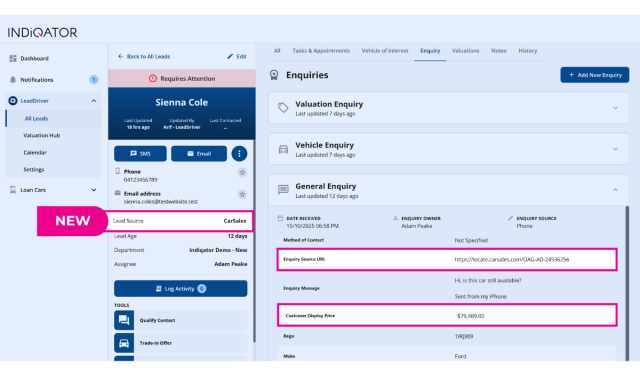
Leads originating from Carsales now display the exact URL where the enquiry was generated. This update also ensures accurate vehicle details are shown, even when stock matching isn’t possible, providing greater transparency and context for sales teams.

29 JULY 2025
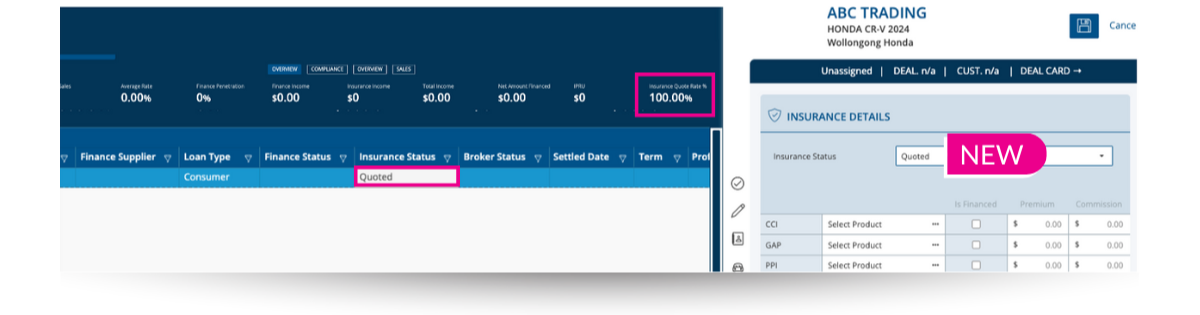
You can now view and update the Insurance Status directly from the log slideout.
New Finance Status Options
Two new options: Clawback and Quoted, have been added to improve deal tracking and visibility.
New KPIs: Finance and Insurance Rate
We’ve introduced two new KPIs to help you measure quote activity across your team: